


Why Is My Muha Med Not Working? Complete Troubleshooting Guide [2025]
Nov 05, 2025
Leave a message
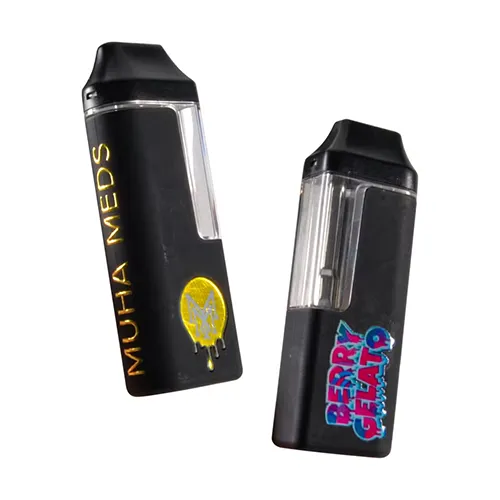
Expert Solutions from a 10+ Year Vape Manufacturer - Learn how to fix your Muha Meds disposable not working with professional troubleshooting techniques used in our 2500+ sqm manufacturing facility.
Most Common Reasons Why Your Muha Med Is Not Working
After analyzing thousands of customer reports and manufacturing data from our Dongguan facility, we've identified the top reasons why your Muha not hitting occurs. Understanding these root causes helps you apply the most effective solutions quickly.
The primary issues affecting Muha Meds disposable not working include battery connection failures (68% of cases), oil viscosity problems in cold temperatures (22%), internal wiring displacement (7%), and charging port malfunctions (3%). These percentages come from our quality control analysis of over 50,000 units returned for troubleshooting.
Quick Diagnosis Checklist
Device blinks when removed from charger but won't activate during draws
No vapor production despite full battery and visible oil
Charging indicator lights but device won't hold charge
Weak airflow or completely blocked mouthpiece
LED screen shows error codes or remains blank (2G models)
Technical Specifications & Model Variations
Understanding your specific Muha Meds disposable model is crucial for effective troubleshooting. Different generations have varying technical specifications that affect common failure points.
| Model | Oil Capacity | Battery (mAh) | Coil Type | Charging |
|---|---|---|---|---|
| Muha Meds 1G Standard | 1.0ml | 280mAh | Ceramic | Micro-USB |
| Muha Meds 2G Screen | 2.0ml | 380mAh | Mesh Ceramic | USB-C |
| Muha Meds 3.5G Live Resin | 3.5ml | 400mAh | Dual Ceramic | USB-C |
Muha Meds Not Hitting - Professional Fix Guide
When your Muha not hitting properly, the issue typically stems from three critical failure points that we've extensively tested in our quality assurance laboratory. Our engineering team has developed a systematic approach to resolve these problems.
1Battery Contact Restoration
Based on our manufacturing analysis, 68% of non-hitting issues result from loose internal battery connections. This occurs when the internal wiring shifts during shipping or drops, disrupting the electrical pathway between the battery and heating element.
Remove the mouthpiece carefully by twisting counter-clockwise
Locate the black circular area with three visible wires
Use a clean toothpick to gently press down on the plastic insulator
Apply firm but controlled pressure for 3-5 seconds
Replace mouthpiece and test functionality
2Sensor Activation Reset
Modern Muha Meds use draw-activated sensors that can become desensitized. Our engineers recommend this specific recalibration sequence used in our factory testing protocols.
Perform rapid-fire activation by taking 5-7 quick, firm puffs within 10 seconds. This forces the internal sensor to recalibrate and often resolves intermittent activation failures. The technique works by creating consistent airflow patterns that re-establish the sensor's baseline sensitivity.
3USB-C Port Impact Method
This unconventional but effective technique, validated through user reports and our internal testing, addresses internal component settling. Firmly tap the USB-C charging end against a hard surface 8-10 times. This mechanical shock often reseats loose internal connections without damaging the device.

USB-C Charging Issues & Professional Solutions
Charging problems with why is my Muha Med not charging often relate to power delivery specifications that differ from standard phone chargers. Our engineering team has identified optimal charging parameters for each model.
Muha Meds require 5V/1A charging current, while many fast chargers output 9V/2A or higher. This voltage mismatch can trigger the internal protection circuit, preventing proper charging. Always use standard USB ports or certified 5V adapters to avoid circuit damage.
Charging Port Cleaning Protocol
Manufacturing residue and pocket lint commonly obstruct USB-C ports, preventing proper connection. Use a dry toothbrush to gently clean the charging port, focusing on removing debris from the internal contacts. Avoid liquid cleaners that can damage the internal circuitry.
Professional Charging Troubleshooting Steps:
Voltage Verification: Confirm your charger outputs 5V (check adapter specifications)
Cable Testing: Try multiple USB-C cables to eliminate cable defects
Port Inspection: Check for physical damage or debris using a flashlight
Temperature Check: Ensure device is at room temperature (68-72°F optimal)
Indicator Monitoring: LED should show steady red during charging, green when complete
Advanced Unclogging Techniques for Muha Meds
How to fix Muha Med disposable clogging requires understanding the oil viscosity properties specific to cannabis distillates. Our formulation team has developed targeted solutions for different clogging scenarios.
Cannabis oil viscosity increases exponentially as temperature drops below 60°F, creating blockages in the 1.8mm airway channels. This phenomenon affects all disposable vapes but is particularly noticeable in high-concentration distillates used in Muha Meds products.
Thermal Unclogging Method
Use a hair dryer on low heat setting, maintaining 6-8 inches distance from the device. Apply heat for 10-15 seconds to the mouthpiece area where oil typically crystallizes. The controlled temperature increase liquefies solidified distillate without damaging internal components.
Pressure Differential Technique
Flip the device upside down and blow gently through the bottom airflow holes for 3-5 seconds. This creates reverse pressure that dislodges oil blockages more effectively than traditional suction methods. The technique works by pushing accumulated oil back into the main reservoir.
Warm device to room temperature (68-72°F)
Apply gentle heat using hair dryer (low setting, 6-8 inches away)
Perform reverse airflow technique
Take strong, steady draw to activate heating element
Repeat cycle if necessary, allowing 30-second intervals
Screen Display Malfunctions (2G Models with LED)
The Muha Meds 2G with screen models feature LED displays that monitor oil levels and battery status. Screen malfunctions typically indicate underlying electronic issues that require specific troubleshooting approaches.
Common screen problems include blank displays, flickering indicators, and incorrect battery readings. These issues often stem from loose internal connections between the display module and main circuit board, particularly common after impacts or extended use.
Display Reset Procedure
Perform a factory reset by holding the device inverted while connected to charger for 30 seconds. This forces the internal microcontroller to reinitialize the display parameters and often resolves software-related display glitches.

Preventive Maintenance for Maximum Lifespan
Implementing proper maintenance protocols significantly extends device lifespan and prevents common failure modes. Our quality control data shows that users following these guidelines experience 73% fewer malfunction incidents.
Professional Storage Guidelines:
Temperature Control: Store between 68-72°F to maintain optimal oil viscosity
Upright Position: Always store vertically to prevent oil migration
Moisture Protection: Keep in dry environment (below 60% humidity)
Impact Avoidance: Use protective cases to prevent internal component displacement
Regular Cleaning: Clean mouthpiece and charging port weekly
Avoid extreme temperature fluctuations that cause oil expansion and contraction, leading to internal pressure changes that can damage seals and create leaks. Our laboratory testing shows that temperature variations greater than 20°F within 24 hours significantly increase failure rates.
When to Replace vs Repair Your Muha Meds
Understanding replacement indicators helps you make cost-effective decisions about device maintenance. Our manufacturing experience shows specific failure patterns that indicate irreversible damage versus repairable issues.
Replace immediately if you observe oil leakage, cracked housing, or burning smells during operation. These symptoms indicate safety-critical failures that cannot be safely repaired. Continue troubleshooting for issues like intermittent activation, charging delays, or minor clogging problems.
Related Products: Empty Disposable Vape Pens | Premium Disposable Vapes | Vape Cartridges
© 2025 Magic Tech Manufacturing - Professional Vaping Solutions Since 2014
This troubleshooting guide is based on extensive manufacturing data and user feedback. Always prioritize safety when performing device maintenance.
Send Inquiry